Showing posts with label hacking. Show all posts

Thursday, 26 December 2019

Identify the vulnerability

We'll cover several common ways a site can be compromised. Hopefully, one of these vulnerabilities will either apply to your site or will shed light on additional possibilities.
Please be aware that vulnerability scanners differ from antivirus scanners. Vulnerability scanners can be far more invasive and have greater potential to cause unwanted damage to your site. Please follow all directions, such as backing up your site, before running the scanner.

Potential vulnerabilities

Potential vulnerabilities to investigate include:

Virus-infected administrator’s computer

On an administrator’s virus-infected computer, the hacker may have installed spyware to record the site admin’s keystrokes.
  • Check for viruses on administrator’s systems. We recommend running several reputable antivirus scanners, or AV scanners, on every computer used by an administrator to log in to the site. Since new malware infections are constantly being designed to evade scanners, this action isn't a foolproof method of virus detection. Since AV scanners might report false positives, running several scanners can provide more data points to determining whether a vulnerability exists. Also consider scanning both your webserver and all devices used to update or post to the site, just to be safe.
    • If the AV scanner detects spyware, a virus, trojan horse, or any suspicious program, investigate the site’s server logs to check for activity by the administrator who owns the infected computer.
    • Log files may have been altered by the hacker. If not, correlating the administrator’s username with suspicious commands in the log file is further evidence that a virus on an administrator’s system caused the site to be vulnerable.

Weak or reused passwords

Cracking a weak password can be relatively easy for hackers, and it provides them direct access to your server. Strong passwords have a combination of letters and numbers, punctuation, no words or slang that might be found in a dictionary. Passwords should only be used for one application, not reused throughout the web. When passwords are reused, it only takes one security breach-on one application for a hacker to find the login-and-password then attempt to reuse it elsewhere.
  • In the server log, check for undesirable activity, such as multiple login attempts for an administrator or an administrator making unexpected commands. Make note of when the suspicious activity occurred because understanding when the hack first took place helps determine what backups may still be clean.

Out-of-date software

Check that your server(s) have installed the latest version of the operating system, content management system, blogging platform, applications, plugins, etc.
  • Research (perhaps through a web search) all installed software to determine if your version contains a security advisory. If so, the possibility that outdated software caused your site to be vulnerable is quite likely.
  • As a best practice, always aim to keep your servers' software up to date, regardless of whether outdated software resulted in vulnerability issues this time.

4. Permissive coding practices, such as open redirects and SQL injections

Open redirects

Open redirects are coded with the intention for the URL structure to allow the addition of another URL so users can reach a useful file or webpage on the site. For example:
http://example.com/page.php?url=http://example.com/good-file.pdf
or
http://example.com/page.php?url=<malware-attack-site>
  • If your site is abused by open redirects, you likely noticed the message in Search Console provided example URLs that included open redirects to an undesirable destination.
  • To prevent open redirects in the future, check if "allow open redirects" is turned on by default in your software, whether your code can prohibit off-domain redirects, or if you can sign the redirect so that only those with properly hashed URLs and the cryptographic signature can be redirected.

SQL injections

SQL injections occur when a hacker is able to add rogue commands to user input fields executed by your database. SQL injections update records in your database with unwanted spam or malware content, or they dump valuable data to output for the hacker. If your site uses a database, and especially if you were infected with the malware type SQL injection, it’s possible that your site was compromised by a SQL injection.

  • Login to the database server and look for suspicious content in the database, such as otherwise regular text fields that now show iframes or scripts.
  • For suspicious values, check that the user input is validated and properly escaped or perhaps strongly typed so they can't be executed as code. if user input isn't checked before database processing, SQL injection may be a root-cause vulnerability on your site.

Thursday, 3 October 2019

Ethical Hacking - Tools

In this chapter, we will discuss in brief some of famous tools that are widely used to prevent hacking and getting unauthorized access to a computer or network system.

NMAP

Nmap stands for Network Mapper. It is an open source tool that is used widely for network discovery and security auditing. Nmap was originally designed to scan large networks, but it can work equally well for single hosts. Network administrators also find it useful for tasks such as network inventory, managing service upgrade schedules, and monitoring host or service uptime.
Nmap uses raw IP packets to determine −
  • what hosts are available on the network,
  • what services those hosts are offering,
  • what operating systems they are running on,
  • what type of firewalls are in use, and other such characteristics.
Nmap runs on all major computer operating systems such as Windows, Mac OS X, and Linux.

Metasploit

Metasploit is one of the most powerful exploit tools. It’s a product of Rapid7 and most of its resources can be found at: www.metasploit.com. It comes in two versions − commercial and free edition. Matasploit can be used with command prompt or with Web UI.
With Metasploit, you can perform the following operations −
  • Conduct basic penetration tests on small networks
  • Run spot checks on the exploitability of vulnerabilities
  • Discover the network or import scan data
  • Browse exploit modules and run individual exploits on hosts

Burp Suit

Burp Suite is a popular platform that is widely used for performing security testing of web applications. It has various tools that work in collaboration to support the entire testing process, from initial mapping and analysis of an application's attack surface, through to finding and exploiting security vulnerabilities.
Burp is easy to use and provides the administrators full control to combine advanced manual techniques with automation for efficient testing. Burp can be easily configured and it contains features to assist even the most experienced testers with their work.

Angry IP Scanner

Angry IP scanner is a lightweight, cross-platform IP address and port scanner. It can scan IP addresses in any range. It can be freely copied and used anywhere. In order to increase the scanning speed, it uses multithreaded approach, wherein a separate scanning thread is created for each scanned IP address.
Angry IP Scanner simply pings each IP address to check if it’s alive, and then, it resolves its hostname, determines the MAC address, scans ports, etc. The amount of gathered data about each host can be saved to TXT, XML, CSV, or IP-Port list files. With help of plugins, Angry IP Scanner can gather any information about scanned IPs.

Cain & Abel

Cain & Abel is a password recovery tool for Microsoft Operating Systems. It helps in easy recovery of various kinds of passwords by employing any of the following methods −
  • sniffing the network,
  • cracking encrypted passwords using Dictionary, Brute-Force and Cryptanalysis attacks,
  • recording VoIP conversations,
  • decoding scrambled passwords,
  • recovering wireless network keys,
  • revealing password boxes,
  • uncovering cached passwords and analyzing routing protocols.
Cain & Abel is a useful tool for security consultants, professional penetration testers and everyone else who plans to use it for ethical reasons.

Ettercap

Ettercap stands for Ethernet Capture. It is a network security tool for Man-in-the-Middle attacks. It features sniffing of live connections, content filtering on the fly and many other interesting tricks. Ettercap has inbuilt features for network and host analysis. It supports active and passive dissection of many protocols.
You can run Ettercap on all the popular operating systems such as Windows, Linux, and Mac OS X.

EtherPeek

EtherPeek is a wonderful tool that simplifies network analysis in a multiprotocol heterogeneous network environment. EtherPeek is a small tool (less than 2 MB) that can be easily installed in a matter of few minutes.
EtherPeek proactively sniffs traffic packets on a network. By default, EtherPeek supports protocols such as AppleTalk, IP, IP Address Resolution Protocol (ARP), NetWare, TCP, UDP, NetBEUI, and NBT packets.

SuperScan

SuperScan is a powerful tool for network administrators to scan TCP ports and resolve hostnames. It has a user friendly interface that you can use to −
  • Perform ping scans and port scans using any IP range.
  • Scan any port range from a built-in list or any given range.
  • View responses from connected hosts.
  • Modify the port list and port descriptions using the built in editor.
  • Merge port lists to build new ones.
  • Connect to any discovered open port.
  • Assign a custom helper application to any port.

QualysGuard

QualysGuard is an integrated suite of tools that can be utilized to simplify security operations and lower the cost of compliance. It delivers critical security intelligence on demand and automates the full spectrum of auditing, compliance and protection for IT systems and web applications.
QualysGuard includes a set of tools that can monitor, detect, and protect your global network.

WebInspect

WebInspect is a web application security assessment tool that helps identify known and unknown vulnerabilities within the Web application layer.
It can also help check that a Web server is configured properly, and attempts common web attacks such as parameter injection, cross-site scripting, directory traversal, and more.

LC4

LC4 was formerly known as L0phtCrack. It is a password auditing and recovery application. It is used to test password strength and sometimes to recover lost Microsoft Windows passwords, by using dictionary, brute-force, and hybrid attacks.
LC4 recovers Windows user account passwords to streamline migration of users to another authentication system or to access accounts whose passwords are lost.

LANguard Network Security Scanner

LANguard Network Scanner monitors a network by scanning connected machines and providing information about each node. You can obtain information about each individual operating system.
It can also detect registry issues and have a report set up in HTML format. For each computer, you can list the netbios name table, current logged-on user, and Mac address.

Network Stumbler

Network stumbler is a WiFi scanner and monitoring tool for Windows. It allows network professionals to detect WLANs. It is widely used by networking enthusiasts and hackers because it helps you find non-broadcasting wireless networks.
Network Stumbler can be used to verify if a network is well configured, its signal strength or coverage, and detect interference between one or more wireless networks. It can also be used to non-authorized connections.

ToneLoc

ToneLoc stands for Tone Locator. It was a popular war dialling computer program written for MS-DOS in the early 90’s. War dialling is a technique of using a modem to automatically scan a list of telephone numbers, usually dialling every number in a local area code.
Malicious hackers use the resulting lists in breaching computer security - for guessing user accounts, or locating modems that might provide an entry-point into computer or other electronic systems.
It can be used by security personnel to detect unauthorized devices on a company’s telephone network.

Sunday, 27 March 2016

Use arp-scan to find hidden devices in your network

The Address Resolution Protocol uses a simple message format containing one address resolution request or response. The size of the ARP message depends on the upper layer and lower layer address sizes, which are given by the type of networking protocol (usually IPv4) in use and the type of hardware or virtual link layer that the upper layer protocol is running on. The message header specifies these types, as well as the size of addresses of each. The message header is completed with the operation code for request (1) and reply (2). The payload of the packet consists of four addresses, the hardware and protocol address of the sender and receiver hosts.Use arp-scan to find hidden devices in your network - blackMORE Ops -1
The principal packet structure of ARP packets is shown in the following table which illustrates the case of IPv4 networks running on Ethernet. In this scenario, the packet has 48-bit fields for the sender hardware address (SHA) and target hardware address (THA), and 32-bit fields for the corresponding sender and target protocol addresses (SPA and TPA). Thus, the ARP packet size in this case is 28 bytes. The EtherType for ARP is 0x0806. (This appears in the Ethernet frame header when the payload is an ARP packet. Not to be confused with PTYPE below, which appears within this encapsulated ARP packet.)
If you have a device that is on the same network but not responding to any requests such as ping, HTTP, HTTPS etc. This is done intentionally, for example a Check Point Firewall doesn’t respond to anything by design. Similarly a Cisco ASA, Router or BIG-IP F5 might not respond to any requests as they are designed to be silent. In those cases, using arp-scan to scan MAC address is a quick way to find those devices.

arp-scan

The ARP Scan Tool (also called ARP Sweep or MAC Scanner) is a very fast ARP packet scanner that shows every active IPv4 device on your Subnet. Since ARP is non-routable, this type of scanner only works on the local LAN (local subnet or network segment).
The ARP Scan Tool shows all active devices even if they have firewalls. Devices cannot hide from ARP packets like they can hide from Ping. To find active IP addresses outside your subnet, use the Ping Scan Tool (a Ping Sweep tool AKA NetScanner).

Install arp-scan

Binary packages are available for the following operating systems:
  1. Debian Linux: arp-scan is part of the standard Debian distribution on Lenny and later.
  2. Ubuntu Linux: arp-scan is available from gutsy (7.10) in universe.
  3. Fedora: arp-scan is available for Fedora 6 and later
  4. RedHat Enterprise Linux: arp-scan is available for RedHat EL 5 and later
  5. Gentoo Linux
  6. FreeBSD: arp-scan is available from the FreeBSD ports collection
  7. OpenBSD: arp-scan is available as an OpenBSD package
Installation is usually as simple as shown below for Debian or Ubuntu like distributions:
root@debian:~# apt-get install arp-scan
(or) 
user@ubuntu:~$ apt-get install arp-scan
Kali Linux being the awesome pentest distro it is, has it pre-installed.

Use arp-scan to find hidden devices

arp-scan can be used to discover IP hosts on the local network. It can discover all hosts, including those that block all IP traffic such as firewalls and systems with ingress filters.
arp-scan works on Ethernet and 802.11 wireless networks. It may also work with token ring and FDDI, but they have not been tested. It does not support serial links such as PPP or SLIP, because ARP is not supported on them. You will need to be root, or arp-scan must be SUID root, in order to run arp-scan, because the functions that it uses to read and write Ethernet packets require root privilege.

Discovering all hosts on the local network

If the system you are testing from has an address on the network you wish to scan, the simplest way to scan it is with a command similar to:
root@kali:~# arp-scan --interface=eth0 --localnet
(or) 
user@ubuntu:~$ sudo arp-scan --interface=eth0 --localnet
Here, --interface=eth0 represents the interface to use for scanning, and --localnet makes arp-scan scan all possible IP addresses on the network connected to this interface, as defined by the interface IP address and netmask. You can omit the --interface option, in which case arp-scan will search the system interface list for the lowest numbered, configured up interface (excluding loopback).
The network interface name depends on the operating system you are using, the network type (Ethernet, Wireless Etc), and for some operating systems on the interface card type as well. In this document, the interface name eth0 is used for examples except where a different network type is being discussed.
All arp-scan options have both a long form like --interface=eth0 and a corresponding short form like -I eth0.
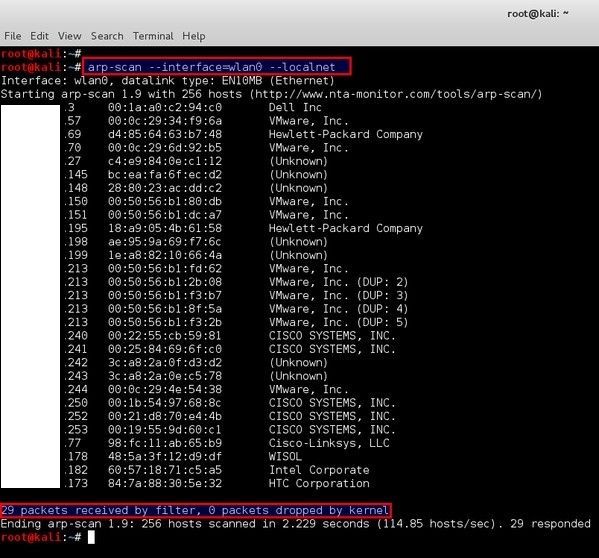
I’ve used the long form in this document for clarity. I’ve also used wlan0 in the following example and I am on a Wireless network.
root@kali:~# arp-scan --interface=wlan0 --localnet
Interface: wlan0, datalink type: EN10MB (Ethernet)
Starting arp-scan 1.9 with 256 hosts (http://www.nta-monitor.com/tools/arp-scan/)
10.0.1.3    0b:1a:a0:c2:94:c0    Dell Inc
10.0.1.57    0b:0c:29:34:f9:6a    VMware, Inc.
10.0.1.69    d4:85:64:63:b7:48    Hewlett-Packard Company
10.0.1.70    0b:0c:29:6d:92:b5    VMware, Inc.
10.0.1.27    c4:e9:84:0e:c1:12    (Unknown)
10.0.1.148    28:80:23:ac:dd:c2    (Unknown)
10.0.1.150    0b:50:56:b1:80:db    VMware, Inc.
10.0.1.151    0b:50:56:b1:dc:a7    VMware, Inc.
10.0.1.195    18:a9:05:4b:61:58    Hewlett-Packard Company
10.0.1.198    ae:95:9a:69:f7:6c    (Unknown)
10.0.1.199    1e:a8:82:10:66:4a    (Unknown)
10.0.1.213    0b:50:56:b1:fd:62    VMware, Inc.
10.0.1.213    0b:50:56:b1:2b:08    VMware, Inc. (DUP: 2)
10.0.1.213    0b:50:56:b1:f3:b7    VMware, Inc. (DUP: 3)
10.0.1.213    0b:50:56:b1:f3:2b    VMware, Inc. (DUP: 4)
10.0.1.213    0b:50:56:b1:8f:5a    VMware, Inc. (DUP: 5)
10.0.1.240    0b:22:55:cb:59:81    CISCO SYSTEMS, INC.
10.0.1.242    3c:a8:2a:0f:d3:d2    (Unknown)
10.0.1.241    0b:25:84:69:6f:c0    CISCO SYSTEMS, INC.
10.0.1.243    3c:a8:2a:0e:c5:78    (Unknown)
10.0.1.244    0b:0c:29:4e:54:38    VMware, Inc.
10.0.1.250    0b:1b:54:97:68:8c    CISCO SYSTEMS, INC.
10.0.1.252    0b:21:d8:70:e4:4b    CISCO SYSTEMS, INC.
10.0.1.253    0b:19:55:9d:60:c1    CISCO SYSTEMS, INC.
10.0.1.145    bc:ea:fa:6f:ec:d2    (Unknown)
10.0.1.77    98:fc:11:ab:65:b9    Cisco-Linksys, LLC
10.0.1.178    48:5a:3f:12:d9:df    WISOL
10.0.1.167    f0:25:b7:3e:a1:b1    (Unknown)
10.0.1.182    60:57:18:71:c5:a5    Intel Corporate

29 packets received by filter, 0 packets dropped by kernel
Ending arp-scan 1.9: 256 hosts scanned in 2.259 seconds (113.32 hosts/sec). 29 responded
root@kali:~#
So in the above example arp-scan was used to scan the network of the device wlan0, and it discovered 29 alive nodes apart from localhost machine. The option --localnet makes arp-scan scan the local network.
Use arp-scan to find hidden devices in your network - blackMORE Ops - 3
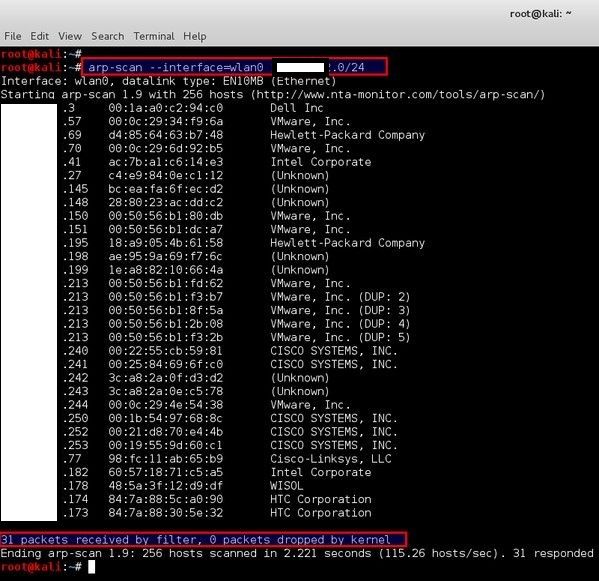
Here is an example showing arp-scan being run against the network 10.0.1.0/24:
root@kali:~# arp-scan --interface=wlan0 10.0.1.0/24
(or)
user@ubuntu:~$ sudo arp-scan --interface=wlan0 10.0.1.0/24
Interface: wlan0, datalink type: EN10MB (Ethernet)
Starting arp-scan 1.9 with 256 hosts (http://www.nta-monitor.com/tools/arp-scan/)
10.0.1.3    0b:1a:a0:c2:94:c0    Dell Inc
10.0.1.57    0b:0c:29:34:f9:6a    VMware, Inc.
10.0.1.69    d4:85:64:63:b7:48    Hewlett-Packard Company
10.0.1.70    0b:0c:29:6d:92:b5    VMware, Inc.
10.0.1.41    ac:7b:a1:c6:14:e3    Intel Corporate
10.0.1.27    c4:e9:84:0e:c1:12    (Unknown)
10.0.1.145    bc:ea:fa:6f:ec:d2    (Unknown)
10.0.1.148    28:80:23:ac:dd:c2    (Unknown)
10.0.1.150    0b:50:56:b1:80:db    VMware, Inc.
10.0.1.151    0b:50:56:b1:dc:a7    VMware, Inc.
10.0.1.195    18:a9:05:4b:61:58    Hewlett-Packard Company
10.0.1.198    ae:95:9a:69:f7:6c    (Unknown)
10.0.1.199    1e:a8:82:10:66:4a    (Unknown)
10.0.1.213    0b:50:56:b1:fd:62    VMware, Inc.
10.0.1.213    0b:50:56:b1:f3:b7    VMware, Inc. (DUP: 2)
10.0.1.213    0b:50:56:b1:8f:5a    VMware, Inc. (DUP: 3)
10.0.1.213    0b:50:56:b1:2b:08    VMware, Inc. (DUP: 4)
10.0.1.213    0b:50:56:b1:f3:2b    VMware, Inc. (DUP: 5)
10.0.1.240    0b:22:55:cb:59:81    CISCO SYSTEMS, INC.
10.0.1.241    0b:25:84:69:6f:c0    CISCO SYSTEMS, INC.
10.0.1.242    3c:a8:2a:0f:d3:d2    (Unknown)
10.0.1.243    3c:a8:2a:0e:c5:78    (Unknown)
10.0.1.244    0b:0c:29:4e:54:38    VMware, Inc.
10.0.1.250    0b:1b:54:97:68:8c    CISCO SYSTEMS, INC.
10.0.1.252    0b:21:d8:70:e4:4b    CISCO SYSTEMS, INC.
10.0.1.253    0b:19:55:9d:60:c1    CISCO SYSTEMS, INC.
10.0.1.77    98:fc:11:ab:65:b9    Cisco-Linksys, LLC
10.0.1.182    60:57:18:71:c5:a5    Intel Corporate
10.0.1.178    48:5a:3f:12:d9:df    WISOL
10.0.1.174    84:7a:88:5c:a0:90    HTC Corporation
10.0.1.173    84:7a:88:30:5e:32    HTC Corporation

31 packets received by filter, 0 packets dropped by kernel
Ending arp-scan 1.9: 256 hosts scanned in 2.221 seconds (115.26 hosts/sec). 31 responded
root@kali:~#
Now I’ve found 31 hosts that responded to this new sweep, so those two are my hidden servers.
Use arp-scan to find hidden devices in your network - blackMORE Ops - 4

Using an interface without an IP address

You can still use arp-scan even if the interface does not have an IP address. If you use arp-scan in this way, it will use the IP address of 0.0.0.0 for the arpsha field in the ARP packet unless you specify the IP address to use with the –arpsha option.
Some operating systems will only respond to ARP requests if the IP address specified in the arpsha field is plausible. The exact rules vary between operating systems, but the most common is that the address in arpsha must be within the IP network of the interface that the ARP request is received on. This is explored further in the fingerprinting section.

ARP spoofing and Proxy ARP

Because ARP does not provide methods for authenticating ARP replies on a network, ARP replies can come from systems other than the one with the required Layer 2 address. An ARP proxy is a system which answers the ARP request on behalf of another system for which it will forward traffic, normally as a part of the network’s design, such as for a dialup internet service. By contrast, in ARP spoofing the answering system, or spoofer, replies to a request for another system’s address with the aim of intercepting data bound for that system. A malicious user may use ARP spoofing to perform a man-in-the-middle or denial-of-service attack on other users on the network. Various software exists to both detect and perform ARP spoofing attacks, though ARP itself does not provide any methods of protection from such attacks.

arp-scan scan help menu - Click to expand

Conclusion

arp-scan is a simple tool yet very powerful.  Those of you who are familiar with Cisco Routers and switches, CheckPoint Firewall and Big-IP F5, you know it too well that sometimes the only way to find a device is by using a arp response. Once you’ve found the MAC address, you can find more info about that device by matching that MAC address to it’s vendor. It is importing to understand ARP/MAC responses for penetration tester and it is used heavily for arpspoof and Man-In-The-Middle Attack. It also helps in cases when someone is spoofing IP address and DoS-ing your server. You can however spoof MAC address easily to evade trace.
All in all, it’s a useful tool and you should try the commands shown above. It will help someday when you are scratching you head in the middle of a service outage!
Thanks for reading, do share.