Monday, 24 September 2018

String Data Type

char(x): This data type is space padded to fill the number of characters specified. Here x is the number of characters to store.
varchar(x): This type got its name from Varying Characters. This data type doesn’t pad unnecessary space. Here x is the number of characters to store
text: This type is used to store long textual information.
Few numeric data type has syntax of data_type(x). Here x is meant for precision value.

Date Time Data Type

datetime: This data type is used to store complete date and time information. The date to be stored has range from 01/01/1753 to 12/31/9999. This data type takes 8 bit for storage purpose. This data type is also termed as timestamp in few database systems.
date: This data type is used to store only date information.
time: This data type is used to store only time specific information.
Few numeric data type has syntax of data_type(x). Here x is meant for precision value.

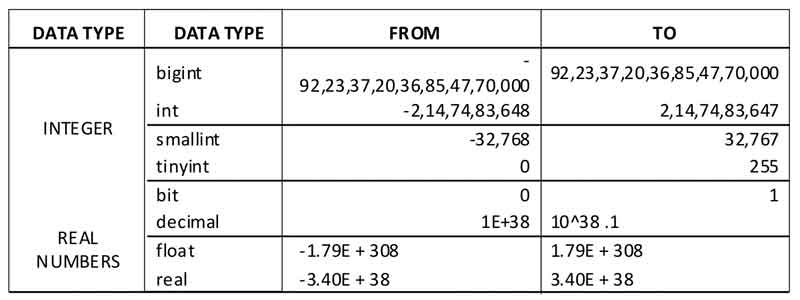
Numeric Data Type

Few numeric data type has syntax of data_type(x). Here x is meant for precision value.
SQL Database Numerica Data Types

SQL Database Data Types

DATA TYPES represents the type of data an object is holding. Data Types are defined for columns of a table, local/global variables, input/output arguments of procedures etc..
Each database system (MS SQL Server, MYSQL, DB2, Oracle etc.) have its own long list of data types but several data types are common in most of them. This article will list down common data types across various database systems.

Saturday, 26 May 2018

How to protect a web site or application from SQL Injection attacks

Developers can prevent SQL Injection vulnerabilities in web applications by utilizing parameterized database queries with bound, typed parameters and careful use of parameterized stored procedures in the database.
This can be accomplished in a variety of programming languages including Java, .NET, PHP, and more.
Please consult the following resources for implementing parameterized database queries and preventing SQL Injection in your code base:
Additionally, developers, system administrators, and database administrators can take further steps to minimize attacks or the impact of successful attacks:
  1. Keep all web application software components including libraries, plug-ins, frameworks, web server software, and database server software up to date with the latest security patches available from vendors.
  2. Utilize the principle of least privilege(link is external) when provisioning accounts used to connect to the SQL database.  For example, if a web site only needs to retrieve web content from a database using SELECT statements, do not give the web site's database connection credentials other privileges such as INSERT, UPDATE, or DELETE privileges. In many cases, these privileges can be managed using appropriate database roles for accounts.  Never allow your web application to connect to the database with Administrator privileges (the "sa" account on Microsoft SQL Server, for instance).
  3. Do not use shared database accounts between different web sites or applications. 
  4. Validate user-supplied input for expected data types, including input fields like drop-down menus or radio buttons, not just fields that allow users to type in input.
  5. Configure proper error reporting and handling on the web server and in the code so that database error messages are never sent to the client web browser. Attackers can leverage technical details in verbose error messages to adjust their queries for successful exploitation.

Friday, 23 March 2018

Use SQL Parameters for Protection

To protect a web site from SQL injection, you can use SQL parameters.
SQL parameters are values that are added to an SQL query at execution time, in a controlled manner.

ASP.NET Razor Example

txtUserId = getRequestString("UserId");
txtSQL = "SELECT * FROM Users WHERE UserId = @0";
db.Execute(txtSQL,txtUserId);
Note that parameters are represented in the SQL statement by a @ marker.
The SQL engine checks each parameter to ensure that it is correct for its column and are treated literally, and not as part of the SQL to be executed.

Another Example

txtNam = getRequestString("CustomerName");
txtAdd = getRequestString("Address");
txtCit = getRequestString("City");
txtSQL = "INSERT INTO Customers (CustomerName,Address,City) Values(@0,@1,@2)";
db.Execute(txtSQL,txtNam,txtAdd,txtCit);

Examples

The following examples shows how to build parameterized queries in some common web languages.
SELECT STATEMENT IN ASP.NET:
txtUserId = getRequestString("UserId");
sql = "SELECT * FROM Customers WHERE CustomerId = @0";
command = new SqlCommand(sql);
command.Parameters.AddWithValue("@0",txtUserID);
command.ExecuteReader();
INSERT INTO STATEMENT IN ASP.NET:
txtNam = getRequestString("CustomerName");
txtAdd = getRequestString("Address");
txtCit = getRequestString("City");
txtSQL = "INSERT INTO Customers (CustomerName,Address,City) Values(@0,@1,@2)";
command = new SqlCommand(txtSQL);
command.Parameters.AddWithValue("@0",txtNam);
command.Parameters.AddWithValue("@1",txtAdd);
command.Parameters.AddWithValue("@2",txtCit);
command.ExecuteNonQuery();
INSERT INTO STATEMENT IN PHP:
$stmt = $dbh->prepare("INSERT INTO Customers (CustomerName,Address,City) 
VALUES (:nam, :add, :cit)");
$stmt->bindParam(':nam', $txtNam);
$stmt->bindParam(':add', $txtAdd);
$stmt->bindParam(':cit', $txtCit);
$stmt->execute();

SQL Injection Based on Batched SQL Statements

Most databases support batched SQL statement.
A batch of SQL statements is a group of two or more SQL statements, separated by semicolons.
The SQL statement below will return all rows from the "Users" table, then delete the "Suppliers" table.

Example

SELECT * FROM Users; DROP TABLE Suppliers
Look at the following example:

Example

txtUserId = getRequestString("UserId");
txtSQL = "SELECT * FROM Users WHERE UserId = " + txtUserId;
And the following input:
User id: 
The valid SQL statement would look like this:

Result

SELECT * FROM Users WHERE UserId = 105DROP TABLE Suppliers;